Welcome
A collectors' reference for the plate flaws of the Australian King George V sideface stamps, from the ½d to the 1/4d. Every flaw is placed on its sheet, so you can see exactly where it sits.
Browse: pick a value, then a pane and a position. Identify: answer a few questions about your stamp. Search: type a position such as 1R55 or a word from a flaw.
- Has a variety
- Awaiting approval
- Your entry, not published
- Rejected claim
- 3Number of entries
No entries are recorded on this pane yet.
Constant flaws not yet located on the sheet, and watermark or perforation errors that aren't tied to one position.
How to read the evidence labels
Being shown on this site means a moderator allowed the entry. It does not prove the variety. The label on each entry says how well the claim is supported.
Identify my stamp
Answer a few questions to find a stamp's watermark, perforation and BW number, then see where its flaws sit on the sheet. This covers every value: the ½d, 1d, 1½d, 2d, 3d, 4d, 4½d, 5d and 1/4d. BW numbers are from the 2026 catalogue.
Imprints and monograms
Sheet markings by period. Summarised from Neil, 1947. Check them against the current ACSC. Dates show when a marking is recorded, and printed sheets could stay in stock for some time.
No sheet markings are recorded for this list yet.
References
The main sources behind this site. Where they disagree, the current Australian Commonwealth Specialists' Catalogue is the working authority. References for a particular variety are shown on its entry.
| Reference | What it covers |
|---|---|
| Brusden-White, Australian Commonwealth Specialists' Catalogue: King George V, Edition 7, 2026 (publisher, review) | Numbers, listings and varieties |
| Stanley Gibbons catalogue | Cross-reference for SG numbers |
| D. M. Neil, The 1d King George V Australian Commonwealth Stamps, 1947 | 1d plates, papers, printers, dies, perforations and imprints |
| V. W. Dix and A. W. Rowntree, The Australian Commonwealth George V Halfpenny, 1959 | ½d electros, numbering and constant flaws |
| British Society of Australian Philately, One Penny Checklist | The full development of the 1d flaws, as recommended by the ACSC |
| Simon Dunkerley, 50 Years of KGV Prices, 2004 | Range of catalogued rarities. Its prices are historical |
| Abacus Auctions sale 253, KGV Heads | Examples of 1d green plate and position citations |
| Stamps of the World, Australia 1926-1930 | Type 5 values, colours and SG numbers |
| APTA, Australian KGV Heads | General overview |
Member guide
This site is a shared reference for the plate positions and varieties of Australian King George V stamps. Anyone can browse it. Members can add flaws, photos and evidence, and an administrator checks new entries before they appear.
New here? Start with these four steps
- Look around. Open Browse, choose a pane on the sheet map, then click a position on the grid.
- Check a stamp. Identify my stamp finds its watermark, perforation and BW number from a few questions.
- Join. Click Create account at the top right. You only need an account to add entries or report a problem.
- Add what you can support. Select a position and click Add an entry for this position. Only the first step of the form is needed.
Getting started
- Click Create account at the top right.
- Enter a display name, your email address and a password of at least 8 characters.
- Open the confirmation email and click its link, then sign in. Check your spam folder if it doesn't arrive.
Your display name is public. It appears as your credit on your entries, so choose one you're happy to see there. It must be 2 to 40 characters, and you can change it with Rename beside your name. Your email address is never shown publicly.
Forgotten your password? Click Sign in, then Forgot your password?, and follow the link in the email.
Please read the Contributor terms, also linked at the bottom of every page, before you add anything.
Finding your way around
Browse has a sheet map and a grid, so you can see where each flaw sits on the sheet. The first row of buttons at the top picks the value, from ½d to 1/4d. Where a value has more than one die or list, a second row picks it. The 2d, for example, has Die I, Die II, On 1½d and Die III. On a phone, the other pages are under Menu.
Not sure what you have? Identify my stamp asks for the value, colour, watermark and perforation, then gives the BW number. Show its flaws on the sheet opens the right list with the filters set, showing only the positions with entries for that stamp. It covers every value: the ½d, 1d, 1½d, 2d, 3d, 4d, 4½d, 5d and 1/4d.
Plates, panes and positions
The 1d was printed from four plates of two panes each, and each pane has 60 positions in 10 rows of 6.
| Plate | Place in the block | Panes |
|---|---|---|
| 1 | Upper left | I and II |
| 2 | Lower left | III and IV |
| 3 | Upper right | V and VI |
| 4 | Lower right | VII and VIII |
- 1d:
VI/21means Pane VI, position 21. Position 1 is the top left stamp of the pane, and numbers run left to right along each row. - 1d Die III: this came from a separate plate, so it has its own grid of 120 positions, in 12 rows of 10.
Die III/101means position 101 on that plate. - ½d: this uses numbered electros instead of plates, each with a left and a right pane.
4L32means Electro 4, left pane, position 32. - 1½d Die I: this used numbered electros too, including 5A, 6A, 9A and 9B, so
5AL1means Electro 5A, left pane, position 1. - 1½d Die II: this used steel Plates 1a, 1, 2, 3 and 4, so
1aL20means Plate 1a, left pane, position 20. A position like1L20exists on more than one list, and search offers each one. - 2d Die I: this used numbered electros, including 4A, 8A and 12A, so
8AL2means Electro 8A, left pane, position 2. - 2d Die II, 2d on 1½d and 2d Die III: these used steel plates, so
3R48means Plate 3, right pane, position 48. - 3d and 4d: these are numbered plates, so
7R58means Plate 7, right pane, position 58. A 3d flaw on both Plates 3 and 4 is listed on each. - 4½d: Die I has one plate, written Plate 1, so
1R55means right pane, position 55. Die II has Plates 2 and 3, which also printed the FIVE PENCE on 4½d. - 5d and 1/4d: the 5d Die I and the 1/4d each have one plate, Plate 1. The 5d Die II has Plates 2 and 3.
To look at a position
- Choose the value from the buttons at the top, and the die if there is more than one, then a pane on the sheet map. On a phone, use the pane tabs instead of the map.
- Click a position on the grid. Its entries appear in the panel beside it.
- To share it, copy the page address from your browser. It opens at that position.
Tick Show only positions with entries above the grid to hide the empty ones. On a keyboard, the arrow keys move around the grid and Enter opens a position.
Search
Search looks through every list. Type a flaw name, a word from a description, an ACSC number, a reference, a name or a date. Type a position such as VI/21, VI 21 or 4L32 to jump straight to it. Matching positions in the current pane are outlined on the grid.
Narrow down
The bar above the grid helps you work out what a stamp could be.
- Choose its colour and its watermark and perforation.
- Panes that weren't recorded for that printing fade, and a note lists the possible ones.
- Add a die or an evidence status to narrow it further. Click Clear to start again.
The filter hides entries recorded only on other printings. It keeps entries with nothing recorded, because they might still apply.
Other places to look
- No known position, below the grid, lists flaws not yet located on the sheet, and watermark or perforation errors not tied to one position.
- Sheet markings lists imprints and monograms by period.
- References lists the main sources behind the site.
Reading an entry
Being shown on the site means a moderator allowed the entry. It doesn't prove the variety, so check the evidence label as well.
Evidence labels
| Label | Meaning |
|---|---|
| Candidate | Claimed, but not yet confirmed |
| Listed in ACSC | Listed in the Australian Commonwealth Specialists' Catalogue, with the number shown starting with BW, and the edition |
| In a published study | Described in a published study, with the reference shown |
| Referred for opinion | Sent for expert opinion, so treat it as unresolved |
| Rejected claim | Examined and not accepted. It stays visible with the reason, so nobody needs to re-examine it |
Grid markings
| What you see | Meaning |
|---|---|
| Green border | At least one entry at this position |
| Number in the cell | More than one entry at this position |
| Dashed orange border | Your own entry, waiting for approval. Only you and administrators see it |
| Grey dashed border | Your own entry that an administrator didn't publish. Only you and administrators see it |
| Grey dotted cell | Only rejected claims at this position |
Plate state and period. A position can change over time, for example from a flaw to a retouch. Entries are listed with the earliest state first. State 1 is the earliest known, and the dates show when that state is known.
Compare states. If a position has two or more entries, click Compare states to see any two side by side. On a phone, they stack one above the other.
Plate history warnings. A yellow note saying an entry doesn't match the recorded plate history means it conflicts with what's currently recorded. It may be a mistake or a real discovery, so treat it with care.
Die II. Collectors call it Die II, but it is a roller flaw, not a separate die. It's recorded only in Pane II, columns 2 and 3.
Adding an entry
Add one entry for each flaw or state. Record only what you can support, and leave a field blank or "Not stated" if you aren't sure. Each entry needs at least a flaw name, a description or a photo.
- Select the position on the grid, then click Add an entry for this position. Or click + Add an entry and choose the pane and position.
- Fill in the fields you can. The form has four steps, and you can submit from any of them.
- Add a photo if you have one, and tick the box confirming you have the right to share it.
- Click Submit for approval. Trusted members see Publish instead.
If the position isn't known, use + Add a variety with no known position below the grid, or tick The position isn't known. You can still give the pane if you know it.
| Step | Field | What to enter |
|---|---|---|
| 1. Position and flaw | Die state | The die or type, or leave it as Not stated |
| Die II spur class | Shown for Die II only. The form tells you the recorded class for that position where one is known | |
| Flaw / error name | A short name, as published if it has one | |
| Description | What it looks like and how to recognise it, in your own words | |
| 2. State and period | State | Flaw, Retouch, Re-entry, Inserted electro, Rolled on new steel or Make-ready |
| State number | 1 is the earliest known state at this position. Use the same number for entries showing the same state | |
| State name | Optional, as published, such as Late state | |
| First known, Last known | 1915, 1915-12 or 1915-12-03, only as exact as your evidence allows | |
| Dates based on | Where the dates come from | |
| Recorded on | The colours, watermarks and perforations you've seen this on. See the pictures below | |
| 3. Evidence | Variety class | Choose the closest class, such as Constant plate variety |
| Evidence status | Candidate, Listed in ACSC or In a published study | |
| ACSC number, ACSC edition | The number as printed, and the edition you checked, chosen from the four latest. Numbers can change between editions, so give the edition your number comes from. The site adds BW at the start, so 71I(2)j shows as BW 71I(2)j | |
| Copies seen | How many separate copies you've examined | |
| References | Up to 10, each with a title, and a page and link if you have them | |
| 4. Photo | Photo | JPEG or PNG, shrunk automatically when uploaded |
| Photo credit | Who took the photo | |
| Photo source link | Where the photo came from, if it's online |
Rules the form checks
- Listed in ACSC needs an ACSC number and edition.
- In a published study needs at least one reference.
- An ACSC number always needs its edition.
Good practice
- Dates: a postmark shows the stamp already existed by that date. It doesn't show when the state began or ended.
- Constant flaws: try to confirm a flaw on two separate copies before calling it constant.
- Catalogues and books: give the number and page reference rather than copying text or images. If you mention an ACSC number in a description or a reference, type BW in front of it, as in BW 71I(2)j.
- Photos: add only photos you took, or ones the photographer has allowed you to share.
If you see a warning when saving. The site compares your entry with the recorded plate history. Check your details first. If you're sure, click save again. The entry will go through for approval and keep the warning, so a real discovery can still be recorded.
After you submit
An administrator reviews each new entry before anyone else can see it. My submissions lists everything you've added, with its status.
| Status | Meaning |
|---|---|
| Awaiting approval | Waiting for an administrator |
| Not published | Not accepted. Any note from the administrator is shown on the entry |
| Archived | Hidden from the public, but kept with its history |
| No status label | Live on the site |
Trusted members. An administrator may make you a trusted member, and your new entries then publish straight away.
Editing. Click Edit on your entry. An edit sends the entry back for approval, even if you change nothing, unless you're a trusted member.
Evidence decisions. Only administrators can mark a claim Referred for opinion or Rejected claim, and they must give a reason. You can still edit that entry, but only an administrator can change that status.
History. Click History on your entry to see what changed, when and by whom. Only you and administrators can see it.
Archiving. Members can't delete entries outright.
- Click Archive to hide your entry from the public. It and its history are kept.
- To bring it back, click Restore under My submissions. You can restore only what you archived yourself.
- To have an entry removed permanently, contact the site owner.
Reporting a problem. If an entry looks wrong, or uses your photo without permission, click Report on the entry and explain why. You need to be signed in. You can also email the address at the bottom of each page.
Watermarks and perforations
Only four watermarks were used. The site shows each one as a small picture, with the perforation beside it.
| Picture | Watermark or paper | Perforation |
|---|---|---|
 | Type 2 Single Crown over A | Single-line 14.2 x 14.2 |
| Type 2 Single Crown over A | Comb 14.25 x 14 |
| Type 2 Single Crown over A, War Savings paper | Comb 14.25 x 14, on an adapted machine |
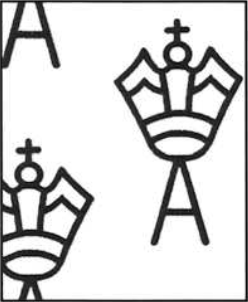 | Type 4 Large Multiple Crown over A | Comb 14.25 x 14 |
| No watermark | Comb 14.25 x 14 | |
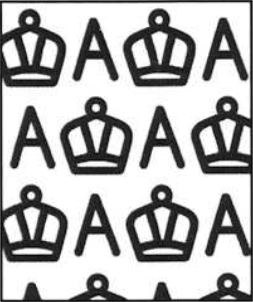 | Type 5 Small Multiple Crown over A | Comb 14.25 x 14 |
| Type 5 Small Multiple Crown over A | Comb 13½ x 12½ |
 | Type 6 Small Crown over C of A | Comb 13½ x 12½ |
Common questions
| Question | Answer |
|---|---|
| Why can't I see my new entry on the public grid? | It's waiting for approval. You can see it under My submissions, and on the grid when signed in |
| Why did my published entry show as awaiting approval? | Editing sends it back for approval |
| Can I add a second flaw at the same position? | Yes. Add a separate entry for each flaw or state |
| What if I don't know the position? | Tick The position isn't known, and the entry goes in the No known position list |
| Does a green border mean the variety is proven? | No. Check the evidence label on the entry |
| Can I use a photo from a forum or auction? | Only with the photographer's permission, and name them in Photo credit |
| Who do I contact for help? | The site owner, using the email address at the bottom of each page |
The site is a volunteer reference and may contain mistakes, so check important details against specialist catalogues. Corrections are welcome.
My submissions
Everything you've added. New entries from members appear on the site once an admin has approved them. Archiving hides an entry but keeps it and its history. To have one removed permanently, contact the site owner.
Awaiting approval
Reported entries
Archived entries
Hidden from the public. Deleting here is permanent and also removes the entry's history and photos, so keep that for rights problems and removal requests.
Members
Trusted members publish their own entries straight away. Admins approve entries and manage members. You can't change your own role.
Import a backup
Load a backup file from the single-page catalogue (.json) into the list currently selected under Browse. Entries are published immediately under your admin account; the old "submitted by" name is kept as the contributor credit. Entries already on the site with the same position, flaw and description are skipped.
Export all data
Download every entry in the current list (all statuses) as a JSON file. Photos are not included, only their locations. Do this regularly as an extra backup.
Export a variety log
Download the published entries in the current list as a CSV file. Its columns match the Variety Log sheet in the inventory workbook, so you can paste them straight in. The Variety ID starts with S- and stays the same for each entry.